Policy Deployment Reporting
Released June 27, 2026
We've added new visibility into policy deployment status across your fleet. You can now see at a glance which devices are running the latest policy version and which are still pending.
What's New
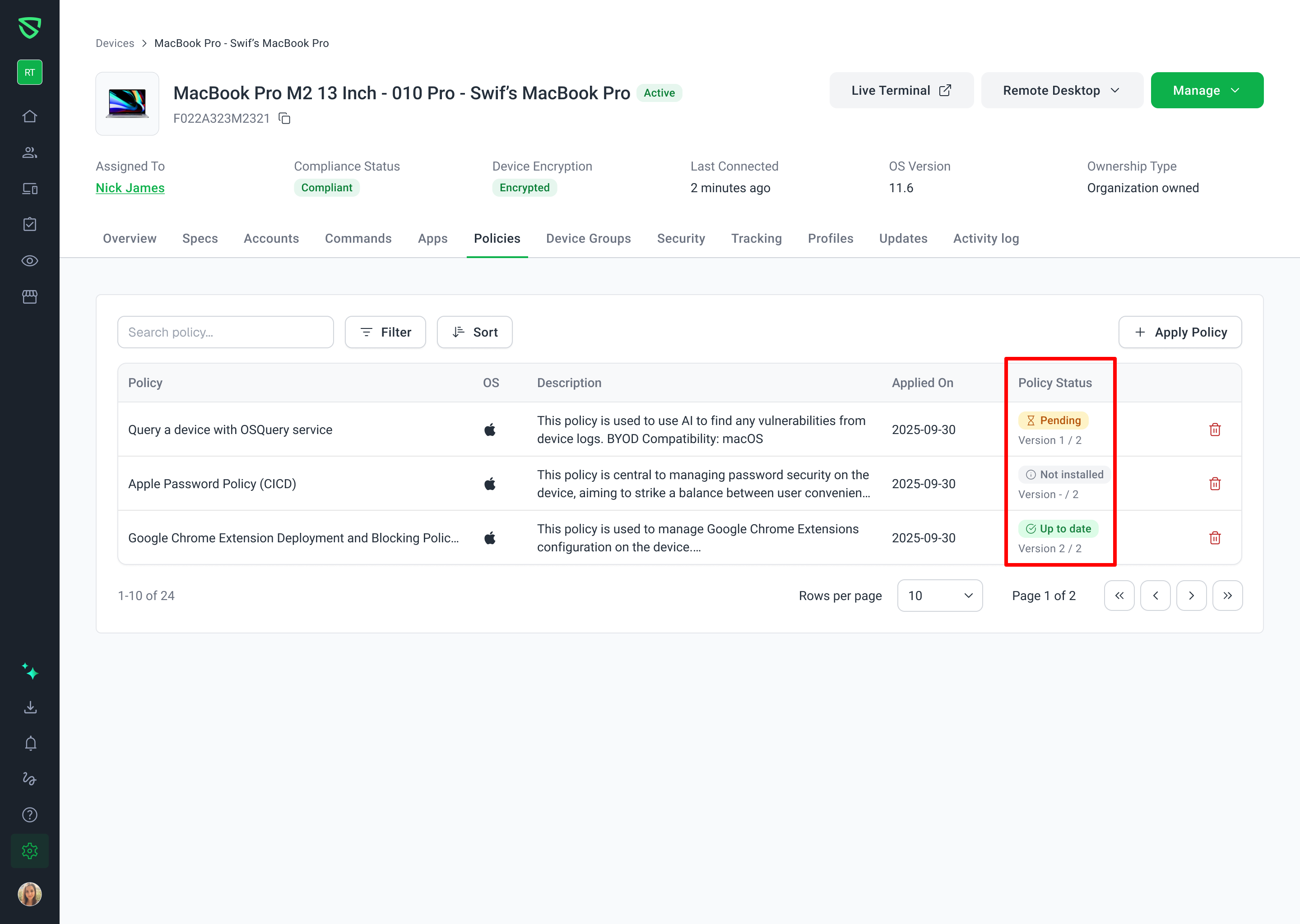
Two new columns — Version and Policy Status — are now available in both the Device Details and Policy Details views.
Version shows the installed version vs. the latest available version:
2 / 2— device has the latest1 / 2— device is behind– / 1— policy has never been installed on the device
Policy Status gives you a quick read on each device:
Up to date — running the latest policy version
Pending — a newer version exists or the policy hasn't been installed yet
Where to Find It
Device Details → Policies tab — see version and status for every policy assigned to a specific device
Policy Details → Devices tab — see version and status for every device targeted by a specific policy
Both views stay in sync — the same device-policy pair shows consistent values regardless of which direction you're looking from.
Additional Details
Status updates in real time when you publish a new policy version
Works with device groups — each device in a group shows its own version and status
Fully compatible with search and filtering
No changes to existing columns or policy management features
Why This Matters
Previously there was no easy way to confirm whether a policy had actually been applied to a device. Now you can instantly identify which devices are behind and take action — no guesswork needed.
Learn more at Understand Policy Deployment Status and Version Reporting.