Improved script configuration for Software App Templates (Workbrew, SentinelOne, CrowdStrike)
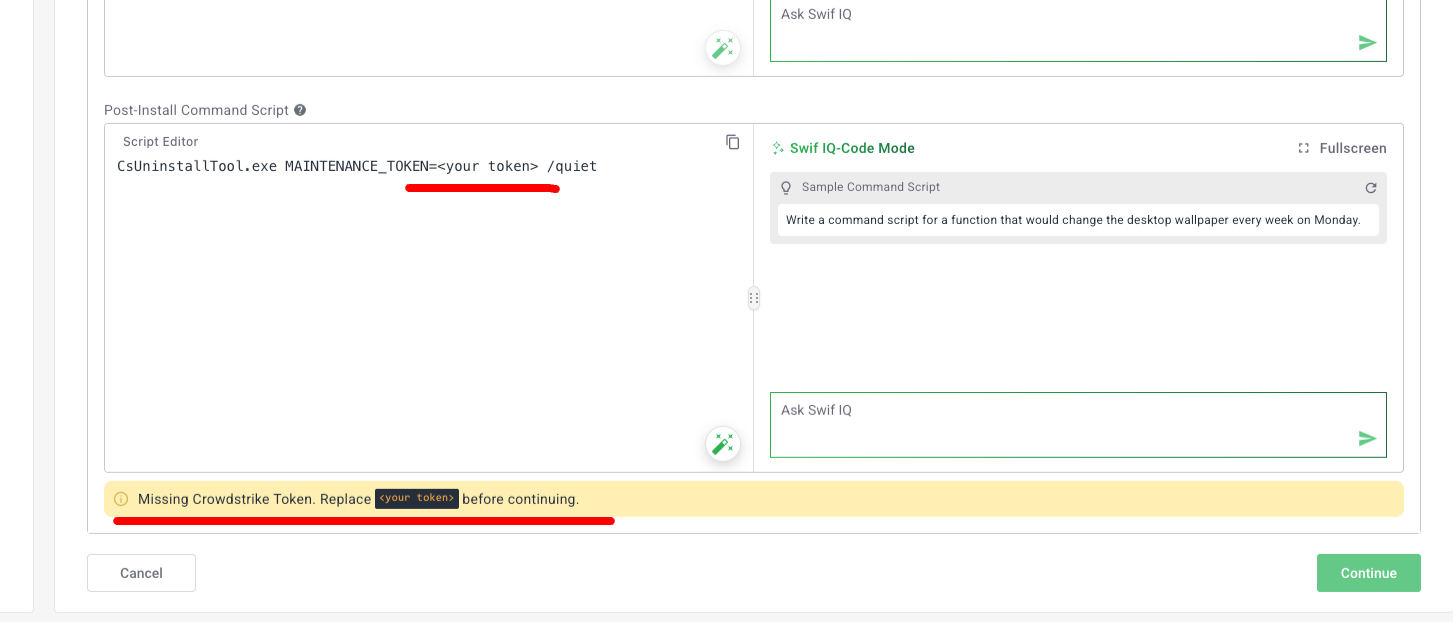
We’ve made it easier and safer to work with install scripts in Software → App templates by adding clear, contextual guidance right where you edit scripts.
What’s new
Contextual warning/attention block in script editor
When you configure scripts in certain app templates, you’ll now see an inline notice near the script editor that:Highlights required variables or values you need to replace (for example, API keys or tenant IDs)
Provides template-specific guidance so you know exactly what to update before deployment
Uses our standard info/warning styling so it’s easy to spot and understand
Applied to key security integrations
The new script guidance is live in:post-install script for macOS, Windows, and Linux
Frontend-only, no behavior change to execution
This update is purely UX/UI: it improves how scripts are presented and configured.
Script execution remains the same; Swif’s scripting already runs with the required privileges and does not require
sudoin your scripts.
Why this matters
Reduces configuration errors caused by hardcoded placeholders.
Makes it clearer which values must be customized per environment.
Speeds up onboarding to new app templates by surfacing “what you need to change” right where you edit scripts.