Changelog

Follow new updates and improvements to Swif.ai.

Extension Attributes in Device Report Exports
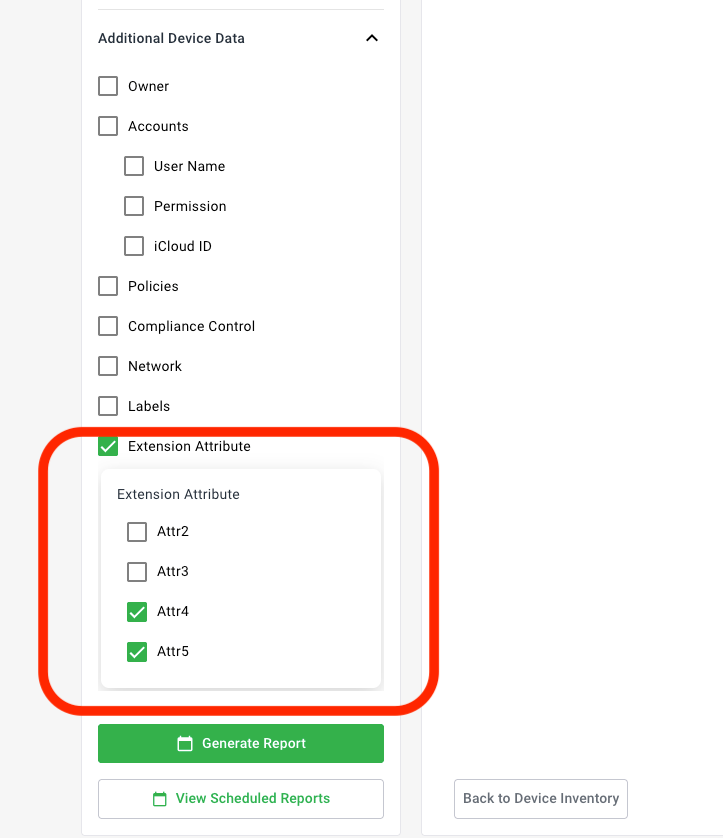
You can now include Extension Attributes as additional columns when exporting your device inventory reports.

What's new

  • Extension Attribute option added under Additional Device Data in the Report Export dialog

  • Attribute picker lets you select exactly which extension attributes to include — such as Asset Tags, Disk Size, or any custom attributes your organization has defined

  • Selected attributes appear as additional columns in both CSV and PDF exports, appended after the standard device columns

  • Column order matches your selection order

Persistence & scheduling

Your extension attribute selections are automatically saved as part of your report configuration. This means they carry over to:

  • Scheduled reports (daily, weekly, monthly)

  • Email-delivered reports

  • Slack-delivered reports

Re-opening the export dialog will restore your previous selections — no need to reconfigure each time.

Supported device categories

  • ✅ Computers (Laptops & Desktops)

  • ✅ Smartphones (Phones & Tablets)

How to use it

  1. Go to Inventory → select your device category

  2. Open the Report Export dialog

  3. Under Additional Device Data, enable Extension Attribute

  4. Select the specific attributes you want included

  5. Click Download — your report will include them as separate columns

📖 Full guide: Exporting Device Report to CSV — Extension Attributes

Improved

Device Assignment Limits for Standard & Growth Plans

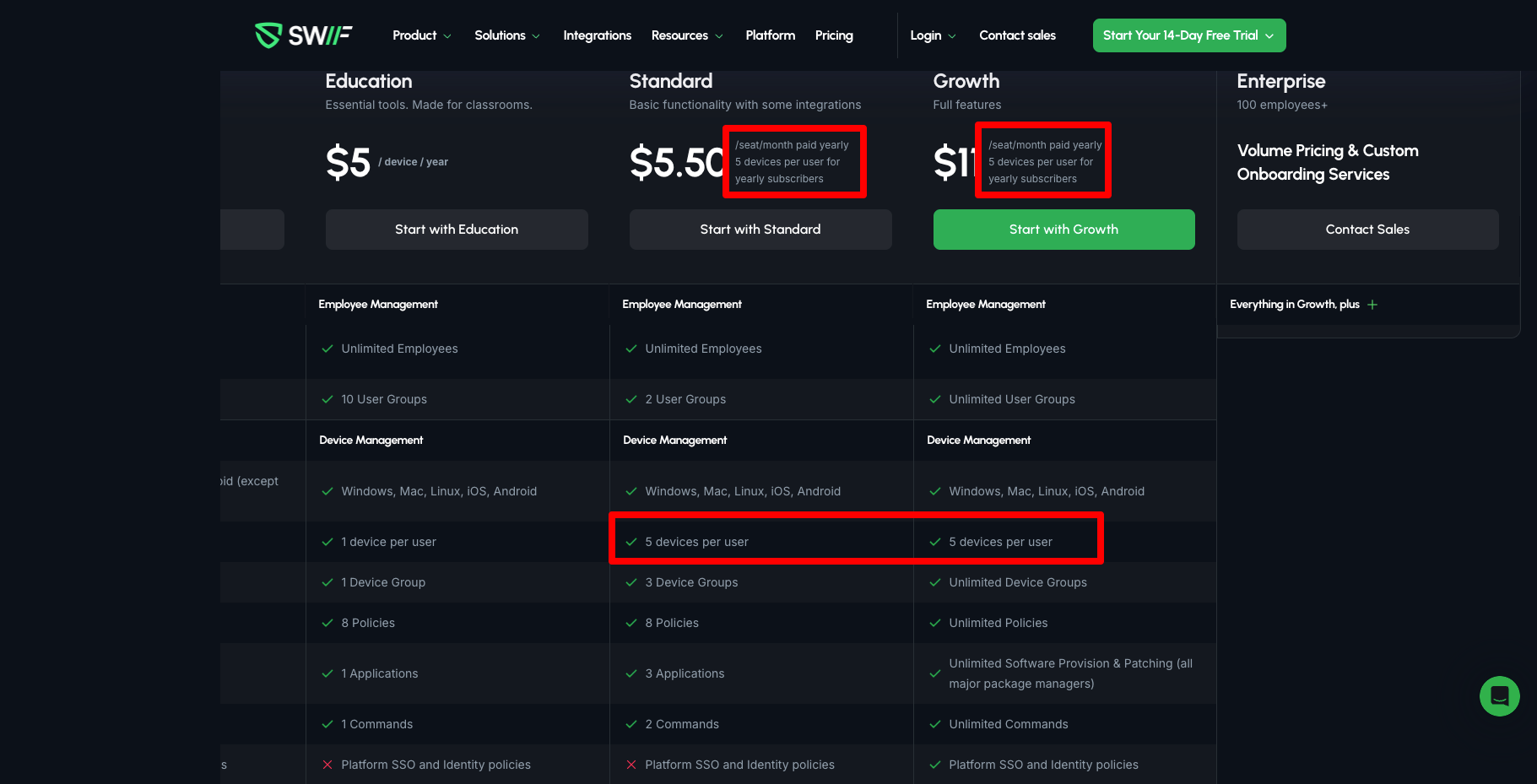
We've introduced per-user device assignment limits for Standard and Growth plan subscribers to provide clearer plan boundaries and a more predictable experience.

What's new:

  • Monthly subscribers can now assign up to 3 devices per user.

  • Yearly subscribers can now assign up to 5 devices per user.

How it works:

  • When you reach your plan's device limit for a user, the app will display a clear warning and prevent additional assignments.

  • This applies to both manual assignments in the web app and automatic assignments during device enrollment via the installer.

  • The Billing Plan page now clearly displays your plan's device-per-user allowance so you always know your limits at a glance.

Assignments within your limit continue to work exactly as before — no action is needed on your part.


Improved

Compliance Marketplace — Redesigned Layout & Special Pricing

June 8, 2026

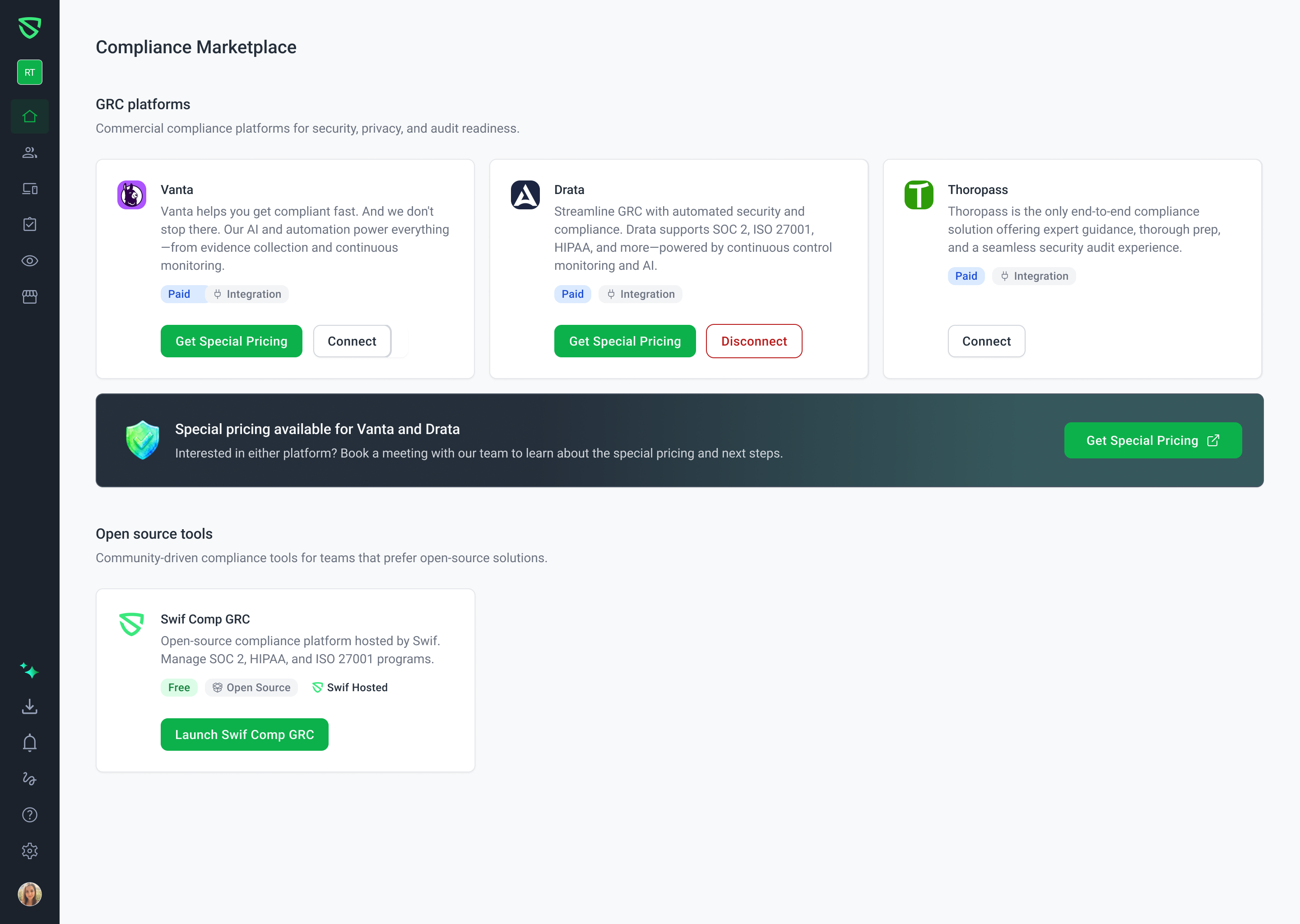
We've given the Compliance Marketplace a fresh look and made it easier than ever to explore the right compliance tools for your team.


What's New

Two Clear Sections: GRC Platforms & Open Source Tools

The marketplace is now organized into two distinct sections so you can quickly find what fits your needs:

  • GRC Platforms — Paid, fully managed compliance solutions with direct integrations (Vanta, Drata, Thoropass).

  • Open Source Tools — Community-driven, free compliance tools for teams that prefer open-source solutions.

Special Pricing Banner

Interested in Vanta or Drata? A new banner between the two sections highlights special pricing available through Swif. Click "Get Special Pricing" to book a meeting with our team and learn about exclusive rates and next steps.

Introducing Swif Comp GRC

What was previously known as "Comp AI" is now Swif Comp GRC — an open-source compliance platform hosted by Swif. The updated card makes it clear: this is a free, self-hosted solution for managing SOC 2, HIPAA, and ISO 27001 programs. The card now features Swif's own branding and logo to reflect our growing investment in making this a first-party experience.

Refreshed UI

The entire page has been rebuilt using our new design system for a cleaner, more consistent look and feel — including updated card layouts, buttons, and typography. Cards now display in a clean three-per-row grid on desktop and wrap responsively on smaller screens.

Streamlined Card Actions

We've simplified the buttons on each card:

  • Removed the generic "Visit Website" button.

  • Added a prominent "Get Special Pricing" button on Vanta and Drata cards, linking directly to booking.

  • Open source tools display a clear "Launch Swif Comp GRC" action instead.

  • Connect / Disconnect integration controls remain unchanged.


Why It Matters

These changes make it faster to evaluate compliance tools, clearer to understand what's free vs. paid, and easier to take advantage of special partner pricing — all without leaving Swif.

Improved

Earlier updates