Fix Compliance Issues in One Click
Release Date: October 17, 2026
Category: Compliance Center
When a policy isn't meeting a compliance control, you no longer have to open the policy, find the wrong settings, and deploy it by hand. The new Fix Issue button in the Compliance Center fixes it for you. You review the changes first, then apply them all at once.
What's New
One-Click Fixes for Policy Issues
Fix Issue Button: Appears next to any policy that isn't meeting a control's requirements. Policies that are fully configured and deployed don't show it.
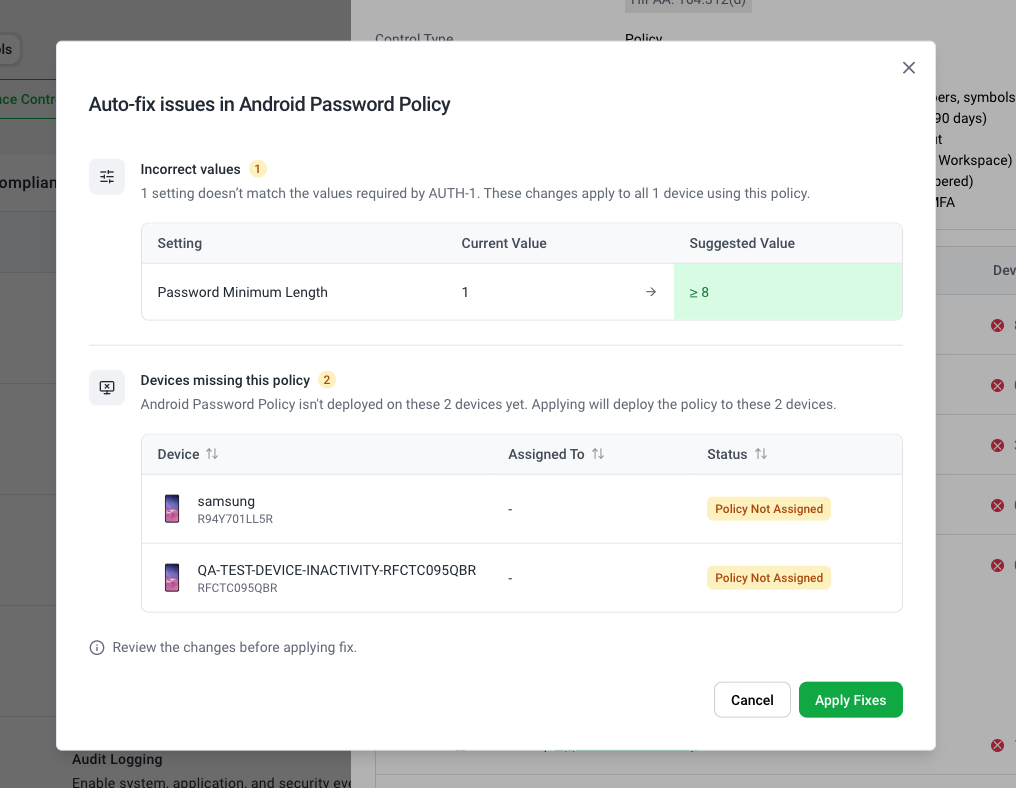
Fixes Incorrect Values: Updates settings that don't match the control, such as a password length that's too short, to the suggested value.
Deploys Missing Policies: Deploys the policy to devices in the control that don't have it yet.
Both at Once: When a policy has both kinds of issues, Swif fixes them together.
Review Before Anything Changes
Clear Confirmation: A confirmation window lists each setting, with its current and suggested value, and each device that will get the policy.
Targeted Fixes: Fixes apply only to the devices in the control that need them.
Apply Fixes: Confirm with one click when you're ready.
See the Result Right Away
Confirmation Message: For example, "Fix applied to Android Lock Screen Policy: Deployed policy to 2 devices."
Updated Coverage: The control's Device Coverage refreshes automatically, so you can watch your compliance score improve.
Easier Navigation
Open Policies in a New Tab: Policy links in the Compliance Center open in a new tab, so you keep your place. You can also right-click a policy name and choose Open in new tab.
Getting Started
Go to Compliance Center > Controls, and open a control.
Expand an operating system row, and find a policy with Fix Issue.
Select Fix Issue, review the changes, and select Apply Fixes.
Fixes reach devices as commands, so coverage can take a few minutes to fully update. Refresh the page if the numbers haven't changed yet.
Learn More: