DESKAPP – Display Custom Compliance Controls
Release Date: 2025-10-15
Platforms: macOS, Windows, Linux
Version: 1.0.145
Key Features & Improvements
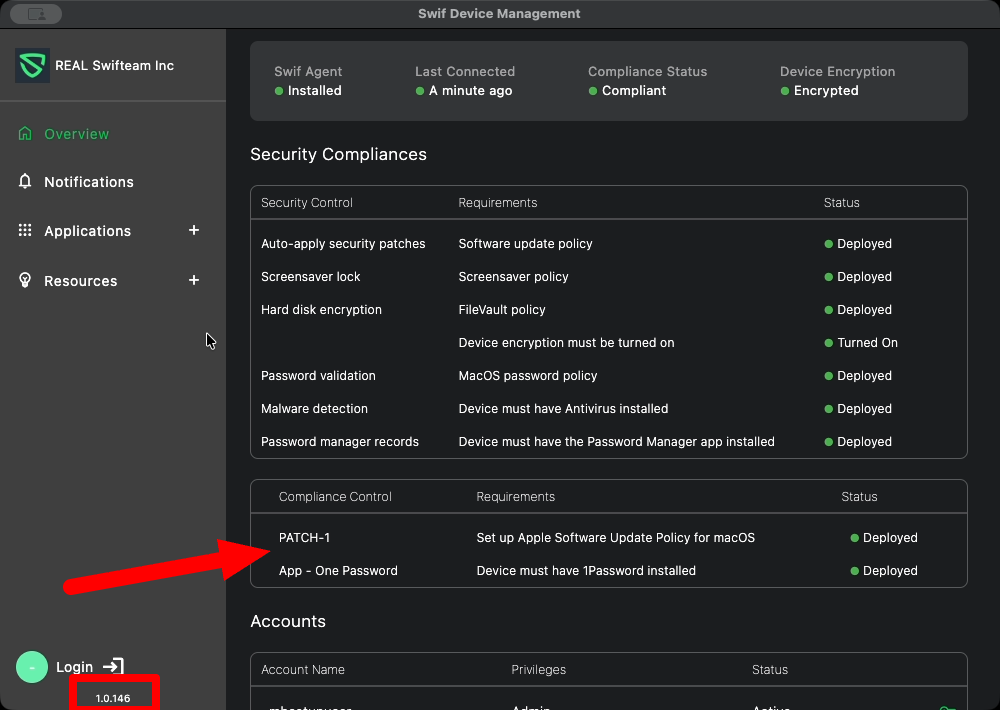
Custom & Group Compliance Controls in Device Overview
The Device Overview screen now displays not only system default compliance controls, but also custom and device group controls.
Custom compliance controls added to a device are now visible in the compliance list, improving transparency for admins and users.
UI/UX Enhancements
The “Security Compliance” column in the compliance table has been renamed to “Security Control” for better clarity.
The label “Security Status” under Device Status has been renamed to “Compliance Status.”
Improved Compliance Status Checking
On app startup, compliance status is checked at 5-minute intervals.
While the compliance check is in progress, the status displays “Checking…” instead of “Not Deployed,” reducing confusion about device state.
Cross-Platform Support
All features have been verified and are available on macOS, Windows, and Linux builds.
Additional Notes
The compliance controls displayed are based on both system defaults and any custom/group controls configured for the device.
The compliance status check interval ensures up-to-date compliance information without unnecessary delays.