Changelog: Billing – Download Receipts
Release Date: October 8, 2025
Labels: Billing, CustomerRequested, ReadyToGo
Overview
This update enhances the Plan & Billing experience by enabling users to download receipts, in addition to invoices, with improved bulk actions and UI consistency.
Key Features
1. Download Receipts and Invoices
Individual Download:
Download individual receipts or invoices directly from the action menu in Billing History.
The “Download receipt” option is disabled for transactions with a “Pending” status.
Bulk Download:
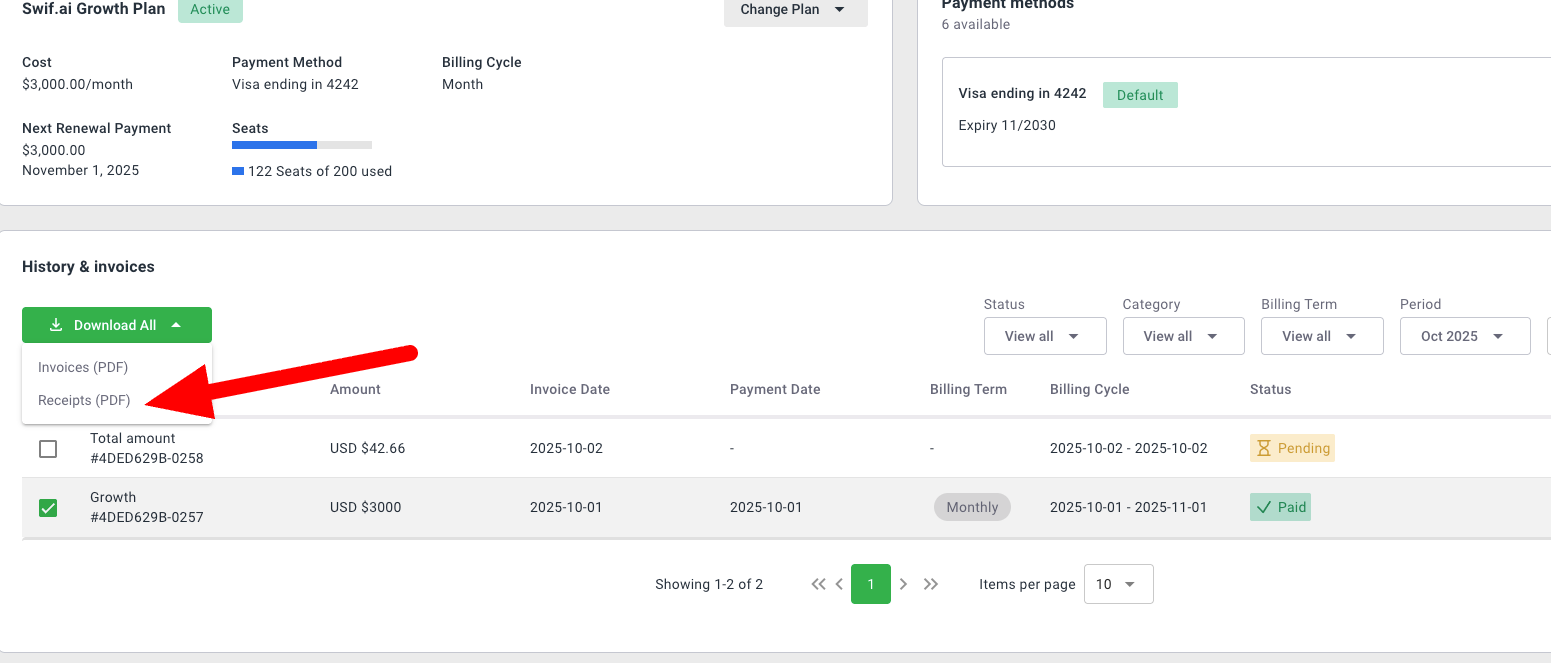
Select multiple completed transactions and download all selected receipts/invoices at once using the dropdown “Download” button.
Download All Button:
The “Download All” button is disabled until at least one item is selected, preventing accidental downloads.
2. UI Improvements & Consistency
Plan Label:
Fixed duplicated plan label. Now displays as “Swif.ai Growth Plan”.
Status Chip:
Standardized the “Active” status chip component for consistency across the UI.
Billing Term Indicator:
Changed the billing term indicator from a label to a tag for better clarity.
Description Column:
Removed the Description column from Billing History as it did not provide meaningful information.
3. User Experience
All downloads are provided as PDFs (either individually or as a zip file for bulk actions).
Improved accessibility and clarity for billing-related actions.
Scenarios
All features were validated with the following scenarios:
Downloading individual receipts and invoices.
Disabling download for pending transactions.
Bulk downloading multiple receipts/invoices.
Ensuring the “Download All” button is only enabled when items are selected.
Verifying UI consistency for plan labels, status chips, billing term tags, and removal of the Description column.