Product Update: AI Device Search, Saved Filters & Granular Hardware Telemetry
Release Date: September 22, 2026
Category: Device Management & Inventory
We’re excited to introduce major enhancements to the Swif Device Inventory experience, making fleet discovery, auditing, and compliance management faster and more flexible than ever.
✨ What’s New
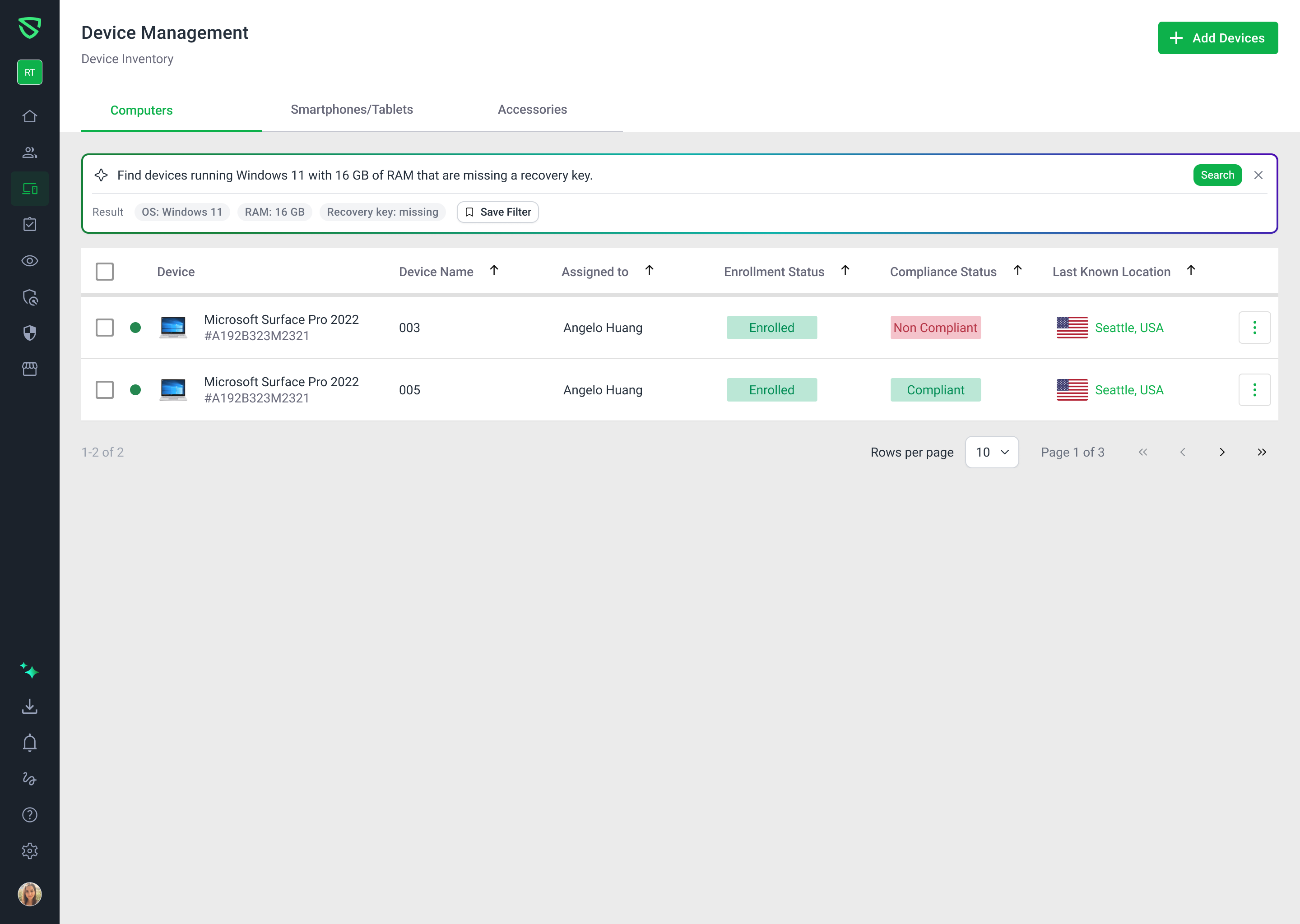
1. AI-Powered Natural Language Device Search
Search across your entire fleet without clicking through multi-level filter menus:
Natural Language Querying: Ask plain-English questions like "Find Windows 11 devices with 16 GB RAM missing recovery keys" to instantly filter results.
Structured Criteria Parsing: Your queries are automatically converted into clear, visual filter tags.
Suggested Prompts: Jumpstart your search using pre-built prompt chips, or refine your queries with intelligent prompt suggestions.
2. Reusable Saved Filters & Management
Standardize recurring audit views across your entire workspace:
Save Searches Instantly: Turn any manual or AI-generated search into a named, reusable filter view.
Filter Combining: Layer ad-hoc manual filters on top of saved filter presets.
Active View Summary: View applied filter tags at a glance with full criteria details available on hover.
Safety Undo: Restored accidental filter deletions with an immediate 10-minute undo window.
3. Deep CPU & GPU Hardware Telemetry
Gain granular visibility into device specifications across macOS, Windows, and Linux endpoints:
CPU Telemetry: Filter and report by architecture (e.g., ARM64, x86_64), processor model, physical cores, logical cores, base clock speeds, and cache sizes.
GPU Telemetry: Identify device models by GPU vendor, dedicated VRAM, shared VRAM, and GPU core counts.
Hardware Auditing: Directly include deep hardware metrics in custom inventory exports and reports.
4. Disk Encryption & Missing Recovery Key Auditing
Strengthen your compliance posture with dedicated recovery key tracking:
Missing Key Filter: Quickly isolate devices lacking escrowed FileVault or BitLocker recovery keys using one-click manual filters or AI prompts (
missing recovery key: true).Targeted Remediation: Immediately trigger re-escrow policies or dispatch user notifications to unblock compliance audits.
For complete step-by-step instructions and best practices, check out the Help Center Guide.