SwifIQ Policy Bot – AI‑Assisted Policy Management
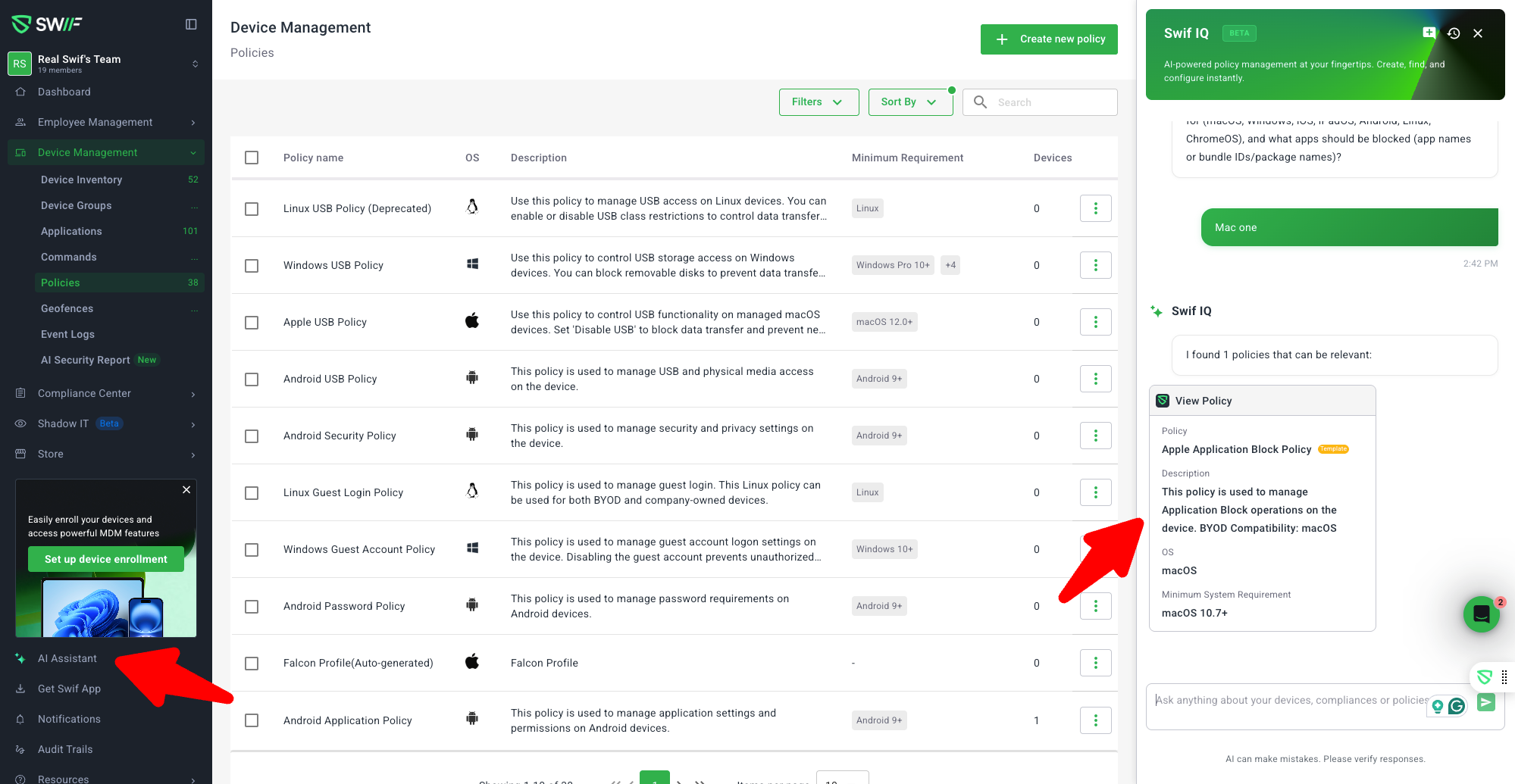
We’ve introduced SwifIQ Policy Bot, an AI‑assisted chatbot embedded directly in the Swif web app to help you understand and configure device policies using natural language, without leaving the page you’re on.
For a full getting started guide, see:
Getting Started with SwifIQ AI Policy Bot | Help Center | Swif.ai
What’s New
1. AI Assistant Side Panel in the Web App
New SwifIQ Policy Bot side panel, accessible from the AI Assistant button in the web app (initially on the Policies pages).
The bot appears as a fixed side panel (not a floating widget), so your main content remains visible.
Layout is fully integrated with the new navigation:
Page content padding adjusts dynamically so the panel does not overlap the UI.
Side panel width and content follow updated design specs for consistency with other Swif panels.
2. Conversational Policy Management
SwifIQ Policy Bot is designed to act like “AI with hands” for policy management—anything you can do with policies manually, it aims to help you do via chat.
Key capabilities:
Answer policy questions in plain language
Examples:“What does Apple Tracking policy do?”
“How do I disable Hot Corners on macOS?”
“Which policies apply to BYOD vs. corporate‑owned devices?”
“What’s the difference between User Account Auto‑Provisioning and User Account Permission Sync?”
Conversational policy creation & editing
You can ask:“Configure Apple Tracking policy.”
“Set all Apple Tracking settings to default.”
“Disable USB tracking.”
“Set screensaver timeout to 5 minutes.”
The bot:
Loads the relevant policy schema.
Interprets your intent (e.g. “set all to default”, “disable USB tracking”, “show all settings”).
Prepares a configuration and then shows a policy edit form inside the side panel for review.
3. In‑Panel Policy Forms, No Forced Redirection
All primary flows (Q&A, policy creation, policy editing) stay inside the chat side panel.
When a policy is created or updated:
The bot does not redirect you away from the chat.
Instead it provides a link to the policy page so you can optionally review or assign it in the main UI.
This allows you to:
Iterate on configurations conversationally.
Keep full context of the conversation next to the policy form.
4. Context‑Aware Prompts & Tooltip
The bot shows context‑aware recommended prompts based on the current page and state
A new tooltip experience explains what SwifIQ Policy Bot can do and encourages first‑time usage.
Prompts are designed around real user questions (e.g. Apple Tracking, App Store, screensaver, Safari policy issues, BYOD vs corporate‑owned).
5. Chat History & Session Management
To support long‑running and repeat workflows, we’ve added chat history:
History UI in the side panel:
See a list of your past conversations with the Policy Bot.
Hover on items to reveal a trash/delete action.
Per‑user conversation storage:
Conversations are stored via a user‑level cache using simple, sequence‑based keys (e.g.
policybot-1,policybot-2).This avoids oversizing a single record while keeping retrieval simple and scoped to each user.
You can:
Reopen a previous session to recall how a policy was configured.
Clean up old or test chats.
6. Extensibility for Future Contexts
Although the initial release focuses on the Policies area:
The side panel and API layer are built to be reused for Devices, Groups, and other contexts.
Future iterations can:
Answer questions like “Why is this device non‑compliant?” or “Which policies apply to this group?”
Surface per‑device or per‑group configuration flows within the same chat experience.
Where to Learn More
Public help article (how to use it):
Getting Started with SwifIQ AI Policy Bot | Help Center | Swif.ai
This release makes policy management more approachable and significantly faster by combining Swif’s policy metadata, help content, and an AI assistant directly in the web app experience.