Swif Changelog – Deploying Android Apps with Swif
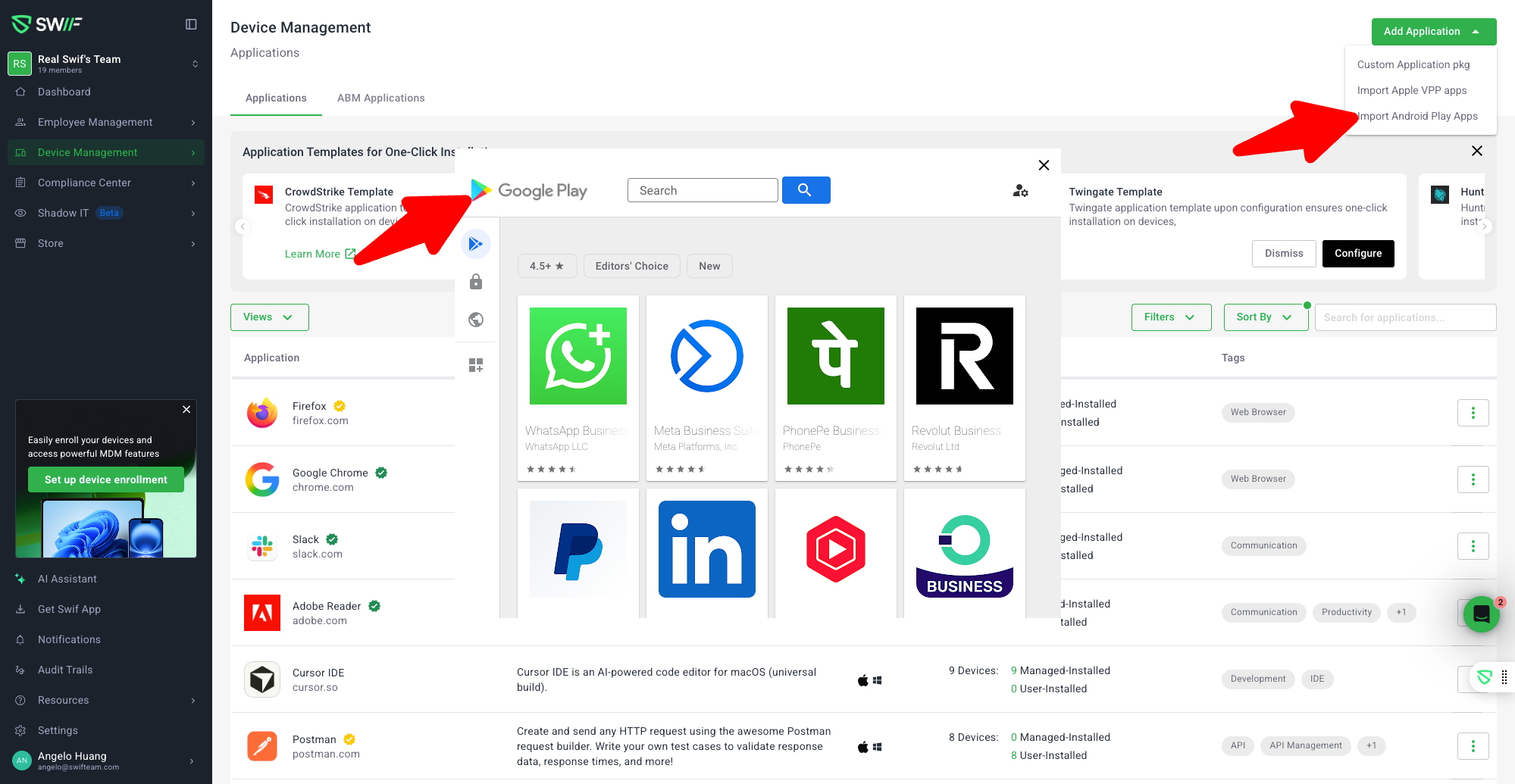
We’ve published a new help article that walks you through deploying Android apps to your managed devices using Swif.
What’s new
End‑to‑end Android app deployment guide
New documentation shows how to deploy Android apps to enrolled devices via Swif MDM:Prerequisites (Android enrollment modes, required permissions, Android Enterprise setup)
How Swif uses Package ID and install types to control installation behavior
How app assignments to devices and groups work in practice
Two ways to add Android apps
The guide explains both supported flows for adding apps to your catalog:Import Android Play apps (recommended)
Uses the embedded Google Play (Managed Play iFrame) experience
Automatically pulls the correct
packageNameas the Package IDCreates and configures the required Web Token behind the scenes
Locks sensitive fields like Package ID (and sometimes install type) to prevent misconfiguration
Create a custom Android app manually
For teams without Android Enterprise or with special/custom apps
Lets you manually define the Name, Package ID, and installType
Aligns with other OS custom app flows (macOS, Windows, Linux) for consistency
Clear explanation of Android install types
The article clarifies how theinstallTypefield works and when to use each:FORCE_INSTALLED – Auto‑installed and cannot be removed (good for required or security‑critical apps)
PREINSTALLED – Auto‑installed once, removable later depending on policy
AVAILABLE – Not auto‑installed; shown in the managed Play Store / self‑service catalog
Assignments and deployment behavior
Step‑by‑step guidance on:Assigning Android apps to individual devices or groups
How install type affects what users see on their devices
How enforcement differs between mandatory vs. optional apps
Troubleshooting and common issues
The guide includes concrete troubleshooting tips for:“Data Not Found” errors in the Google Play iframe (Android Enterprise / Web Token configuration issues)
Apps not appearing or installing on devices (enrollment, Package ID, installType, and assignment checks)
Users unable to remove apps set as FORCE_INSTALLED, and how to adjust install type if allowed
You can read the full article here:
https://help.swif.ai/en/articles/13266192-deploying-android-apps-with-swif