Shadow IT – Manual Provisioning & Deprovisioning Checklists
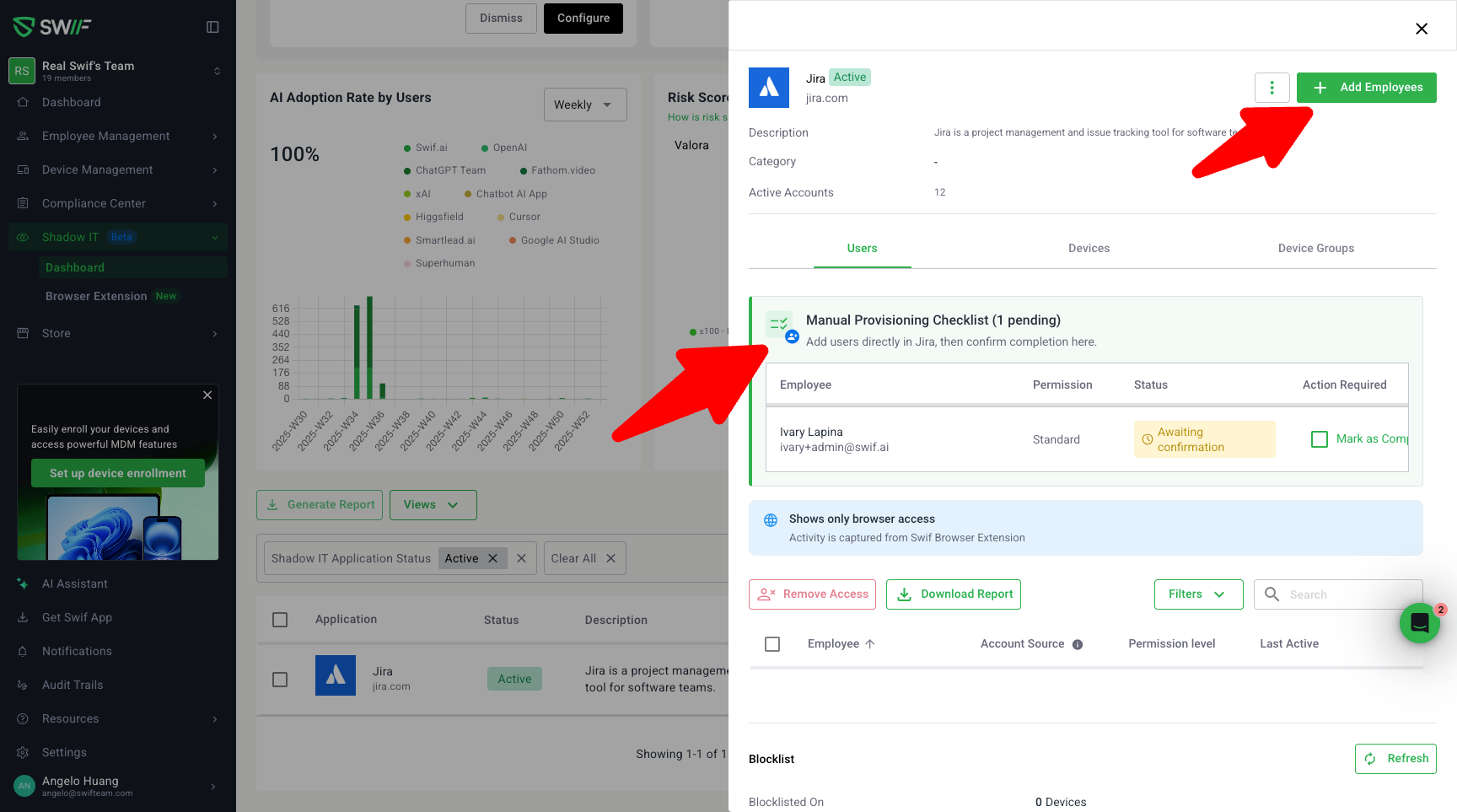
We’ve improved how Shadow IT app provisioning and deprovisioning works for admins by adding clear, checklist-based flows for both automated and manual apps.
What’s new
Provision / Deprovision labels that match the real behavior
For apps that support auto-provisioning, the action is now clearly labeled “Provision Employees” instead of “Invite”.
For manual apps, the action is labeled “Add Employees” so it’s obvious that Swif is not creating the accounts for you.
For deprovisioning, automated flows use “Revoke Access”, while manual flows use “Remove Access Record”, so you can easily tell whether Swif will call the app API or just update records.
Guided checklists for manual work
When you manually add or remove access, Swif now creates a TODO checklist that explains what you still need to do directly in the target app (e.g., actually remove the user from the app).
Each checklist item includes:
Clear step-by-step instructions for the manual action
A Status column and “Mark as Completed” flow with a confirmation modal, so you acknowledge that you’ve finished the work in the app.
These checklists are designed to avoid confusion: they explicitly state that Swif is tracking tasks for you, not performing the manual actions in the third‑party app.
Better visibility and feedback in the UI
The checklist area has updated styling (background, icons, status indicators) to make pending items more visible and easier to scan.
New attention boxes highlight when an app supports auto-provisioning or auto-deprovisioning, so you immediately know if Swif will call the app or just track tasks.
Hovering over “XX employees” now shows a tooltip listing the selected employees, both for individual and bulk actions.
Success toasts confirm when:
An automated provision/deprovision action has been triggered
A manual checklist item has been marked as completed.
Bulk actions for mixed scenarios
The bulk action button has been updated from “Revoke All” to “Remove Access” to cover both:
Auto‑deprovisioned users (via API when a valid token exists)
Users that require manual deprovisioning, with a checklist created for the admin.
A new bulk confirmation modal shows which employees will be handled automatically vs. which will create manual checklist tasks, along with tooltips explaining the follow‑up steps.
Why it matters
These changes make Shadow IT provisioning/deprovisioning:
Clearer – It’s obvious when Swif is calling an app vs. when you still need to do something manually.
Safer – Checklists help ensure no employee is accidentally left with access after you think you’ve removed them.
Easier to manage at scale – Bulk flows and improved visibility help admins handle large sets of accounts with mixed automated/manual capabilities.