Activity Logs & Audit Trails for Remote Access
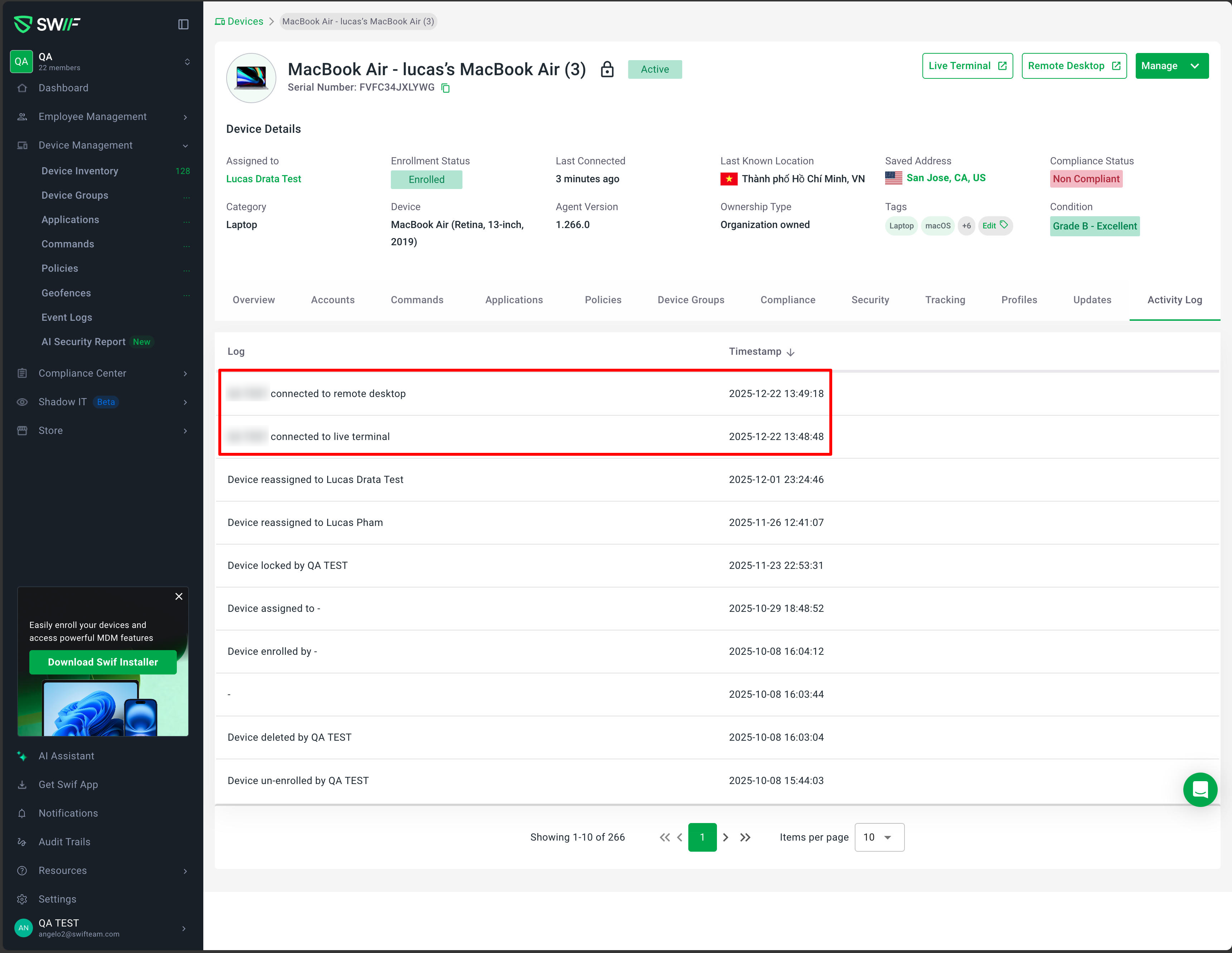
We’ve improved how Swif tracks remote access so that security and compliance teams get clearer, more complete visibility.
What’s new
Device Activity Logs for Remote Sessions
When an admin starts a Remote Terminal session from a device, Swif now records a detailed entry in that device’s Activity Logs (including device, admin, timestamp, and a clear description like “Remote terminal session started by [admin]”).
When an admin starts a Remote Desktop session, Swif likewise creates a dedicated activity log entry tied to the device and admin.
Organization-wide Audit Trails for Remote Actions
Remote Terminal and Remote Desktop actions that affect organization settings or policies are now written to Audit Trails at the org level.
Each audit record includes the acting admin, category, affected device/user, timestamp, and a concise summary of what changed.
Clear Timeline for Multiple Sessions
Multiple remote sessions on the same device generate distinct, chronologically ordered entries in both Device Activity Logs and Audit Trails.
This makes it easier to reconstruct a sequence of remote access events for investigations, customer support, or compliance reviews.
Why this matters
These enhancements ensure that all remote terminal and remote desktop actions are properly logged at both the device and organization level, improving traceability, auditability, and security oversight for teams using PersonifyCare with Swif.