ABM Device Enrollment Readiness for Mac
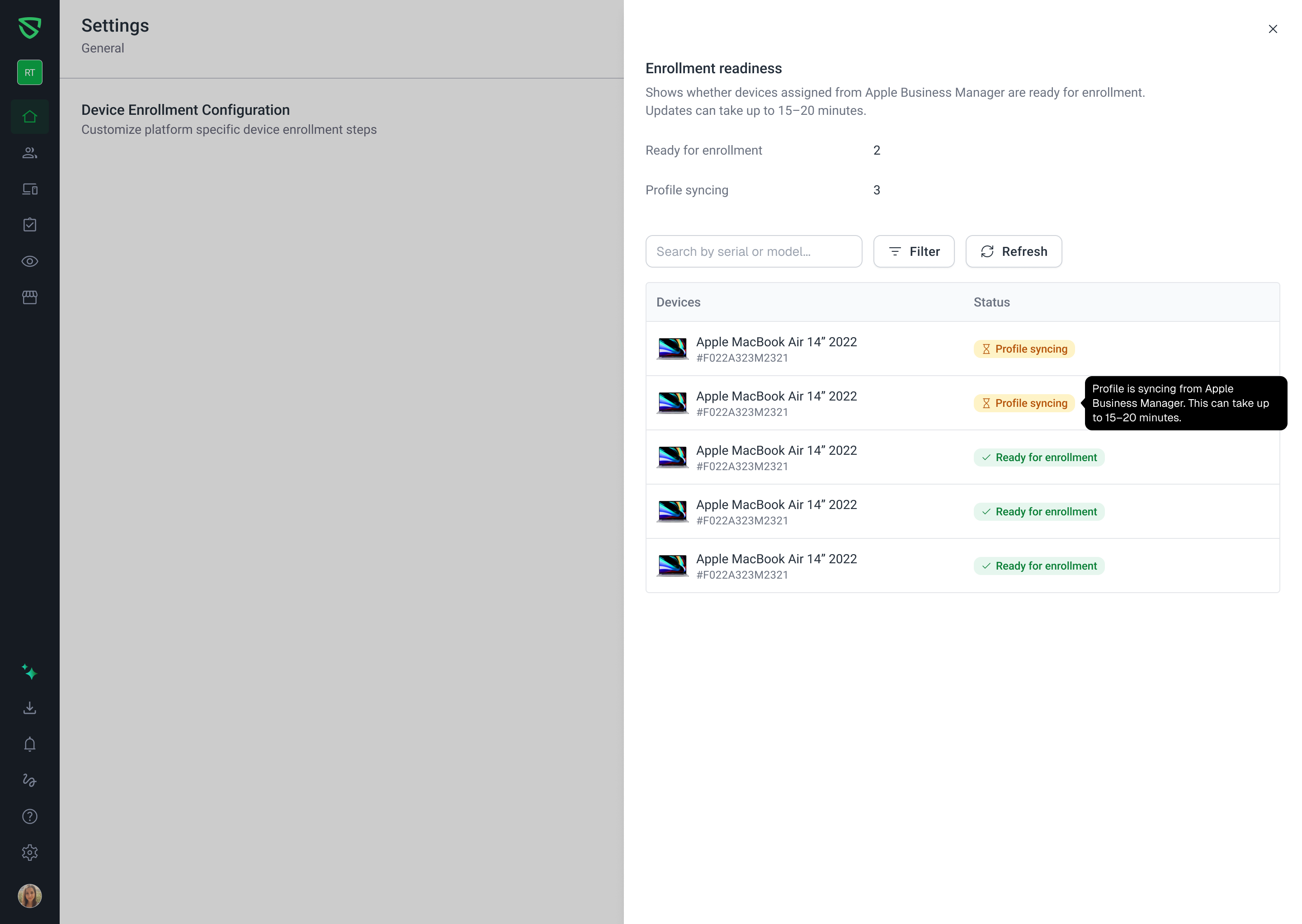
We’ve added a new way to quickly verify that your Apple Business Manager (ABM) devices are visible to Swif and ready for Automated Device Enrollment (ADE) on macOS.
🔗 Help doc: Link Your Apple Business Manager (ABM) Account With Swif | Help Center | Swif.ai
What’s new
A new ABM Device Enrollment Readiness section is now available under:
Settings → General → Device Enrollment Configuration
This section:
Shows whether Swif can successfully see your ABM‑assigned Mac devices
Breaks devices down into:
Profile syncing – ABM is still pushing or finalizing the MDM profile
(profile_status = "pushed"or empty)Ready for enrollment – devices are ready to enroll via ADE
(profile_status = "assigned")
Provides a simple visibility status:
OK – devices visible in ABM
NOT OK – e.g., ABM token expired or not configured
API error – temporary communication issue with ABM
Lets you click “View devices” to open a detail panel with:
A list of ABM‑assigned devices
Filters by status (e.g., show only “Ready for enrollment”)
When all devices are ready for enrollment, the attention box switches to a success state so you can immediately see that ADE is fully ready.
Who is impacted
Admins using Apple Business Manager with Swif MDM for Mac ADE
Especially useful for:
New ADE deployments or pilots
Validating ABM configuration for prospects/customers like Tessl
No changes are required for end users; this is an admin‑only enhancement.
Why this matters
Previously, it was hard to tell if a Mac enrollment issue was due to:
ABM not assigning devices correctly, or
Swif not being able to see those devices.
The new readiness section gives you:
A single place in Settings to confirm:
ABM integration health
Device visibility
ADE readiness state
Clear signals when:
The ABM token has expired or ABM isn’t configured
There’s a temporary API error reaching ABM
This reduces guesswork and shortens troubleshooting when enrollment doesn’t behave as expected.
Performance / rollout notes
ABM visibility and device readiness are only queried when:
You open or refresh the Device Enrollment Configuration section in Settings
This keeps ABM checks lightweight and scoped to admins who actually need the information.