Shadow IT: New Status Framework, All Apps View & User View
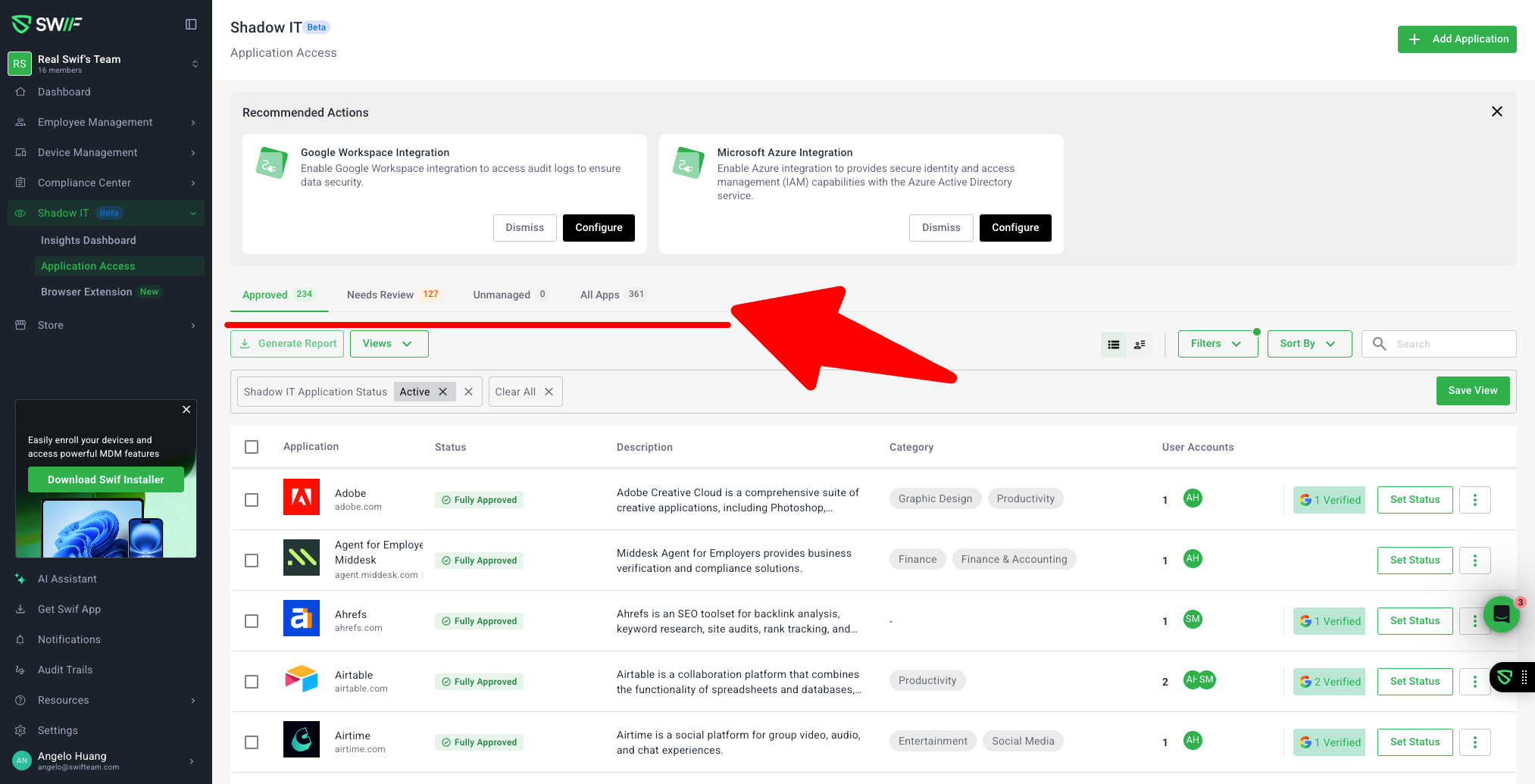
We’ve introduced a new status framework and updated views in Shadow IT to make it easier to review and track applications across your organization.
What’s new
4-stage Shadow IT status model
Every app can now be classified using clear, consistent statuses:Fully Approved – App is approved for general use across the organization.
Individually Approved – App is approved only for specific employees/devices.
Needs Review – App requires a security or compliance review.
Unmanaged – App is discovered but not yet governed by a policy.
Restricted – App is not allowed for use in the organization (implemented in the framework and surfaced in related tickets).
These statuses are shown as status badges and are used consistently across Shadow IT screens. An internal Archived state remains an application lifecycle status and is not part of the new Shadow IT status filter.
All Apps view with unified status filtering
The All Apps tab now shows all Shadow IT app categories in a single table, with:A Status column that displays the new badges.
A Status filter that lets you quickly narrow down to:
Fully Approved
Individually Approved
Needs Review
Unmanaged
Restricted
This makes it much easier to:
See everything installed in one place.
Filter for apps that need attention (for example, only “Needs Review”).
Confirm which apps have already been reviewed or approved.
User View toggle (App View ↔ User View)
A new User View toggle lets you switch context between:App View – grouped by applications.
User View – grouped by users, so you can see which apps each person is using.
When you switch to User View, the app category tabs in the header are hidden, giving you a cleaner, user-centric view of Shadow IT usage.
Shared UI framework for Shadow IT statuses
Under the hood, we’ve added:Shared status badge components.
A reusable table + filter framework for Shadow IT tabs.
Consistent row actions entry points and patterns.
This framework is used by the All Apps and User View, and will be reused in follow‑up tickets (e.g. ST‑6789, ST‑6790, ST‑6791) for category-specific behaviors like individually approving apps or restricting/blocklisting them.
Why this matters
These changes are designed to support workflows like:
Reviewing all apps installed on a device or used by an employee.
Marking apps as reviewed/approved so that next month you only see what’s new or changed.
Quickly spotting new, unmanaged, or needs‑review apps that might be risky.
Together, the new status model, All Apps view, and User View make it easier to operationalize Shadow IT reviews and keep track of what’s already been reviewed versus what still needs action.
Learn more
For detailed definitions and examples of each status, see:
Shadow IT status framework: All Apps, Approved, Unmanaged, Needs Review, and Prohibited | Help Center | Swif.ai