Remote Desktop for Windows – Connect with RustDesk
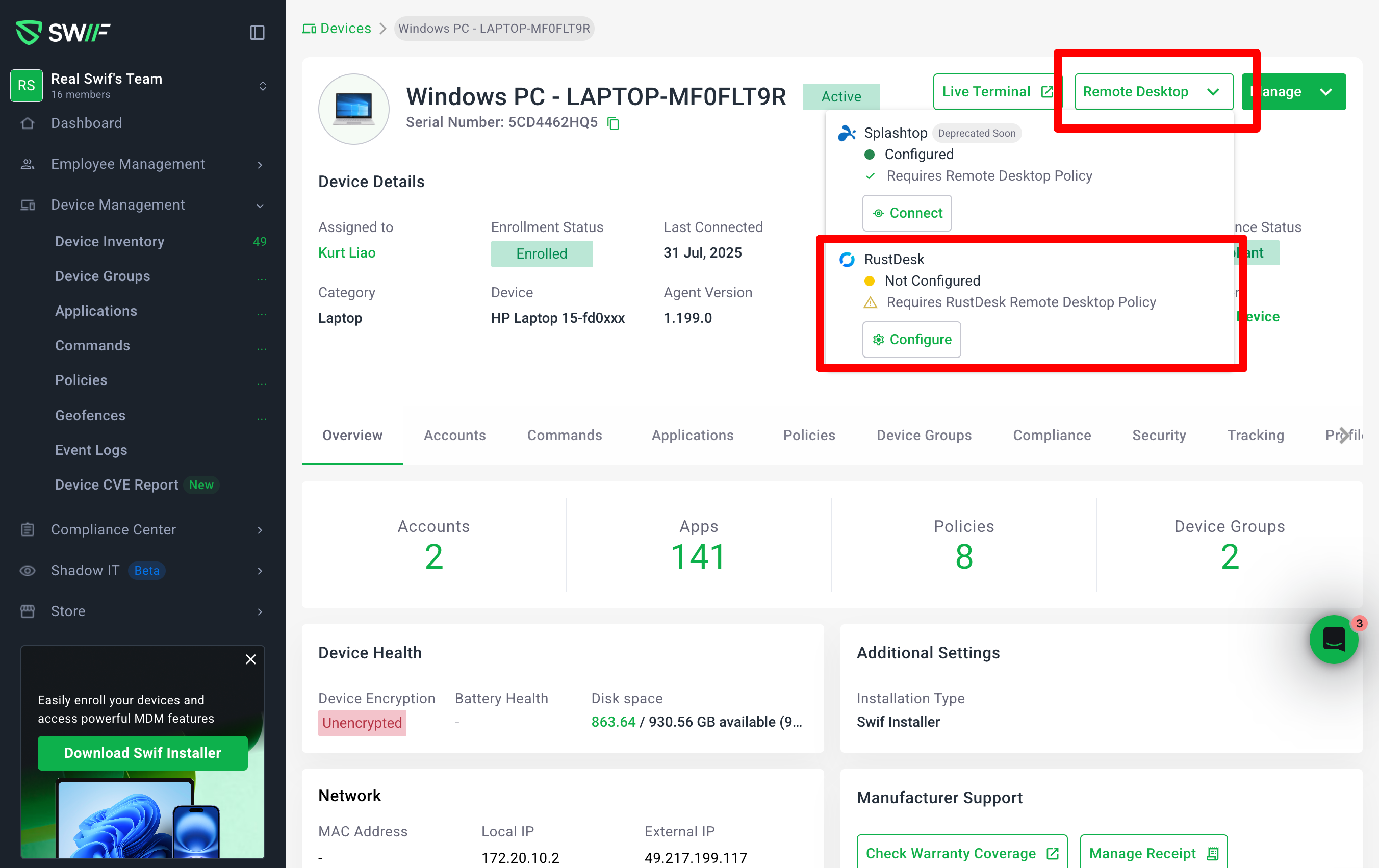
You can now use RustDesk as a remote desktop provider for Windows devices in Swif.
What’s new
Always-available Remote Desktop button
The Remote Desktop CTA on Windows devices is now always enabled.
Clicking it opens a provider dropdown instead of being disabled when not configured.
Choose your provider (Windows)
For Windows devices, you can choose:
Splashtop (Deprecated Soon)
RustDesk
Each provider row shows:
Policy status:
ConfiguredorNot ConfiguredAction:
Connect(when configured) orConfigure(when not configured)
Clear “Configured / Not Configured” states
Not Configured is shown when:
No remote desktop policy exists for that provider, or
A team policy exists but the device doesn’t have it applied, or
The policy exists but device-level enable flags are off.
Configured is shown when:
A valid policy is applied to the device and
enableRustdesk/enableSplashtopis enabled.
Clicking Configure routes you to:
Create a new policy (if none exists),
Assign an existing policy to the device, or
Enable configuration if it’s currently disabled.
Connection flow with ID & password (RustDesk + Splashtop)
When you click Connect on a configured provider, Swif:
Calls the backend to open a remote desktop session.
Shows a screen with the connection ID and password when available (no dynamic link yet).
If the connection can’t be established or data is missing:
You see a clear notice and a Retry button.
Clicking Retry triggers a new attempt and, if successful, shows the ID & password screen.
Better handling of “taking a while” states
Instead of a small tooltip, the new layout explains that remote desktop might take time to be ready.
A Refresh CTA lets you check again when the session is likely available.
Improved tooltip copy
The Remote Desktop tooltip now focuses on how to proceed, e.g.:
“Choose a Remote Desktop provider to connect to this device”
This replaces blocking or error-focused language.
Controller downloads for admins
Team admins can download RustDesk/Splashtop controllers directly from Swif:
macOS
Windows
Linux
Each download button points to the correct OS-specific installer.
Visibility/behavior for non-admins follows the product’s role-based access design.
Availability
Supported for Windows devices in Swif’s WebApp.
RustDesk is now available alongside Splashtop, with Splashtop clearly marked as “Deprecated Soon” for Windows.
Learn more
Full setup and usage guide for Windows is available here:
Remote Desktop for Windows – Connect with RustDesk
Remote Desktop for Windows: Connect with RustDesk | Help Center | Swif.ai