Area | Change | Details |
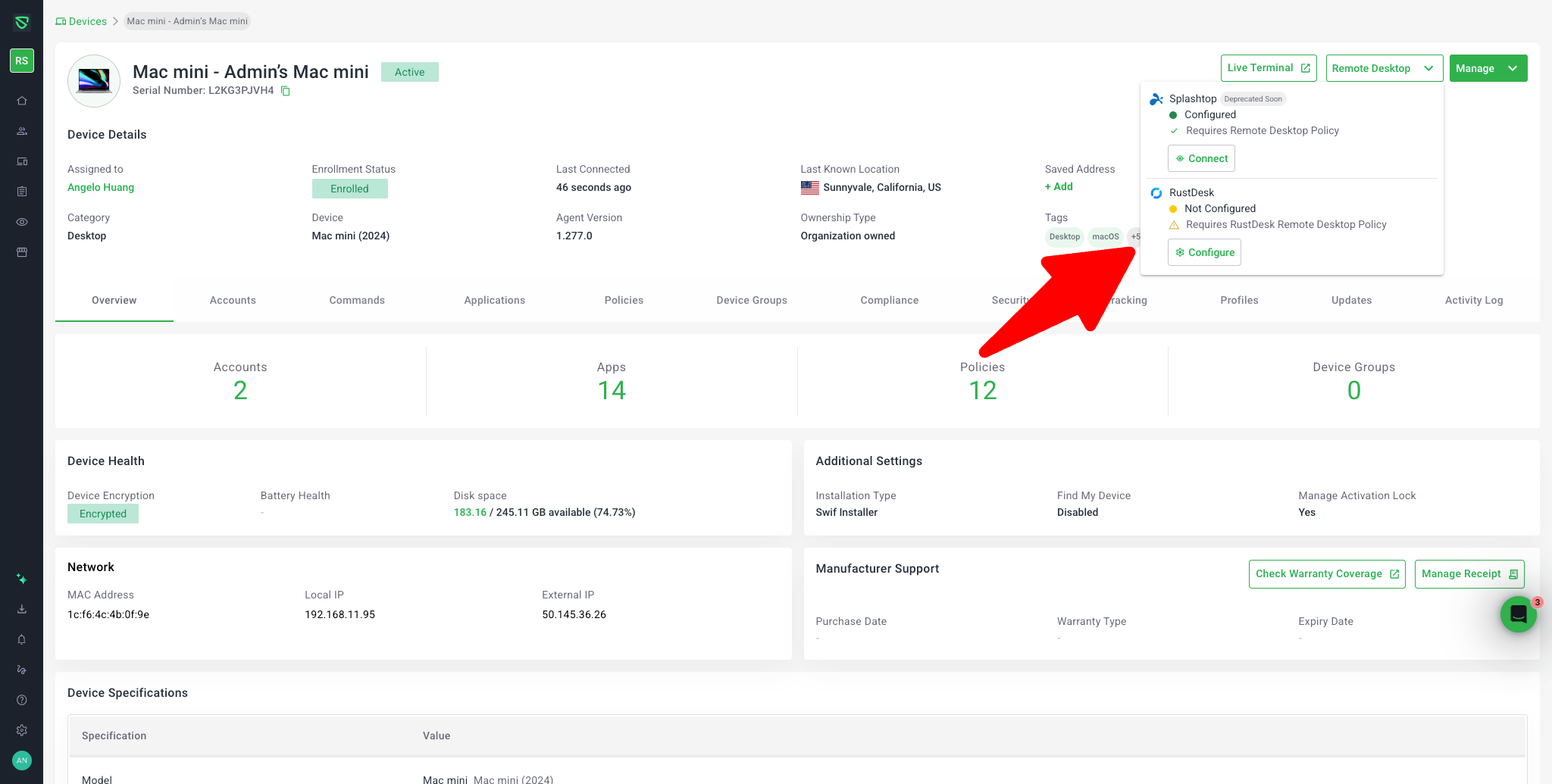
RustDesk support on macOS | Added RustDesk as a Remote Desktop provider for Mac devices | Mac devices can now be connected via RustDesk, in addition to existing Splashtop support. Teams can assign and use both providers while we validate RustDesk across more environments. |
Provider selection UI | New Remote Desktop dropdown | The “Remote Desktop” button is now always enabled. Clicking it opens a dropdown where admins can choose the provider (for Mac: Splashtop (Deprecated Soon) and RustDesk) and see its status (“Configured” / “Not Configured”) and action (“Connect” / “Configure”). |
Clear status & actions | Unified “Configured” vs “Not Configured” logic | For each provider: Configured → Connect; Not Configured → Configure. “Not Configured” covers all cases where a policy or device setup is missing or disabled. Clicking Configure guides you to create, assign, or enable the right policy (behavior is unchanged from previous Remote Desktop policies). |
Connection flow | Show RustDesk ID & password in the UI | When you click Connect for a configured RustDesk policy on Mac, Swif shows the RustDesk ID and Password returned by the backend, following the new Remote Desktop 1.1.0 layout. There’s no dynamic deep-link yet; admins copy/paste these values into their RustDesk controller. |
Error handling | New failure notice & Retry | If the connectionId or password cannot be retrieved (or the API fails), Swif shows a clear notice and a Retry button instead of incomplete connection details (Remote Desktop 1.1.1). Clicking Retry triggers a fresh connection attempt. |
Slow / provisioning state | New “may take time” screen with Refresh | For cases where the connection is configured but still being provisioned, Swif no longer relies on a tooltip. Instead it uses a dedicated layout explaining that RustDesk may take time to be ready and surfaces a Refresh CTA to check again (Remote Desktop 1.0.1). |
Tooltip help | Updated Remote Desktop tooltip text | The tooltip now focuses on resolution: “Choose a Remote Desktop provider to connect to this device”, instead of blocking language, making it clearer how to proceed. |
Cross‑platform consistency | Consistent layout across Mac, Windows, Linux | All OS now share the same Remote Desktop UI styling (dropdown, status, actions, connection screens). Options differ by OS: Mac: Splashtop (Deprecated Soon) + RustDesk, Windows: Splashtop only, Linux: RustDesk only. Splashtop is clearly marked as (Deprecated Soon) on Mac and Windows. |
Controller downloads | Download RustDesk controllers from Swif | Team admins can now download controller installers directly from the Remote Desktop area for macOS, Windows, and Linux. Downloads are scoped as per admin/non-admin visibility rules. |